If You Only Ever Send 1 Real Estate Postcard, Send This One.
Connect Your CRM & Launch With Your Favorite AI
Select your Real Estate CRM and whether you're mailing Cold Leads or your Existing Sphere. We'll generate a custom, copy-and-paste prompt engineered with Thanks.io's MCP Server and your CRM's exact integration endpoints so Claude, ChatGPT, or Gemini can build and wire up the entire campaign for you.
https://mcp.thanks.io/mcpscans.scan_update webhook back to Follow Up BossCopy & Paste This Into Claude, ChatGPT, Gemini, or Cursor
I am a real estate professional in [YOUR CITY / TARGET ZIP CODES]. I want you to help me launch and automate the Thanks.io "Monthly Market Update" 6x9 Postcard Campaign (from https://thanks.io/mmo) and connect it to my CRM: Follow Up Boss (FUB).

My Campaign Goal: EXISTING SPHERE OF INFLUENCE (SOI) & PAST CLIENTS
My Home Valuation / QR Code Landing Page URL: [YOUR HOME VALUATION URL — or Your FUB integrated home valuation page (e.g., Homebot, RealScout, Cloud CMA, Sierra, or Ylopo seller report URL)]

---
### 🔌 MCP SERVER & INTEGRATION CONTEXT (READ FIRST)
1. **Thanks.io Product MCP Server:** `https://mcp.thanks.io/mcp` (OAuth 2.0 sign-in, or Bearer API key with "Allow MCP access" enabled at https://dashboard.thanks.io/app/settings/api-access).
   - If you are not yet connected to `https://mcp.thanks.io/mcp`, walk me through connecting it in this app first (or using `npx -y mcp-remote https://mcp.thanks.io/mcp`).
   - Also reference the Thanks.io Documentation MCP Server at `https://docs.thanks.io/mcp` (and https://docs.thanks.io/llms.txt) for exact REST API v2 payloads.
2. **My CRM Connection (Follow Up Boss (FUB)):**
   - **MCP / API Path:** Connect Thanks.io MCP (https://mcp.thanks.io/mcp) alongside Follow Up Boss via Zapier MCP, community FUB MCP (followupboss-mcp), or FUB REST API v1 (https://api.followupboss.com/v1/people & /v1/events with Basic Auth + X-System header).
   - **Inbound (CRM -> Thanks.io):** Tag contacts in FUB (e.g., #MonthlyMarketUpdate or #MMO) to automatically sync them to your Thanks.io 'Monthly Market Update' mailing list via the FUB Embedded App, API Nation, or Zapier, or push directly via the Thanks.io Mailing List Inbound Webhook.
   - **Outbound (Thanks.io Scans & Delivery -> CRM):** When a homeowner scans the postcard QR code (scans.scan_update webhook) or USPS delivers the card (order_item.delivered), Thanks.io automatically logs a Note on the FUB person timeline and creates a high-priority Call Task assigned to the agent (or triggers a FUB Action Plan via POST /v1/events).

---
### 🛠️ CRITICAL THANKS.IO TECHNICAL RULES (DO NOT VIOLATE)
- **Two Different Variable Syntaxes:**
  - Inside **Message Templates** (`message` body), ALWAYS use **`%PERCENT%`** tags: `%FIRST_NAME%`, `%FULL_NAME%`, `%ADDRESS%`, `%STREET_ONLY%`, `%CITY%`, `%STATE%`, `%ZIP%`, `%CURRENT_DAY%`, `%CURRENT_MONTH%`, `%YOUR_FULL_NAME%`, `%YOUR_PHONE%`, `%YOUR_EMAIL%`.
  - Inside **Dynamic Image Templates** and **QR Code URLs** (`qrcode_url`), ALWAYS use **`~TILDE~`** tags: `~STREET_VIEW~`, `~MAP_VIEW~`, `~FULL_NAME~`, `~FIRST_NAME~`, `~ADDRESS~`, `~FULL_ADDRESS~`, `~EMAIL~`, `~MESSAGE_QR~`.
- **Preview Before Sending:** Always call `preview-order` first to render front/back PNG proof URLs and calculate exact pricing. Show me the proofs and total cost and wait for my explicit "Yes" before calling `send-postcard` or `set-campaign-active`.
- **Creative ID Rule:** When passing `creative_id` to `preview-order` or `send-postcard`, omit `front_image_url`, `image_template`, `message`, `message_template`, and `handwriting_style` so the API does not return a 422 error.

---
### 🚀 STEP-BY-STEP EXECUTION PLAN FOR YOU TO RUN NOW

### STEP 1: AUDIT MY THANKS.IO ACCOUNT & IMPORT THE 2 OFFICIAL TEMPLATES
1. Call `get-account-overview`, `list-image-templates`, `list-message-templates`, `list-creatives`, and `list-mailing-lists` on `https://mcp.thanks.io/mcp`.
2. Check if I already have the **Monthly Market Update** dynamic image template and message template in my account. If not, give me these two direct 1-click import links (which I should click while logged into https://dashboard.thanks.io) OR create them for me using `create-image-template` and `create-message-template`:
   - **Front Dynamic Image Template (6x9 Street View + Top-Right QR):** https://dashboard.thanks.io/share/dynamic_image/4X9Q-ZYTV-46VC-V3AL
     - Layout: Option #2 (QR Code at Top Right)
     - Background Image: `Street View` (`~STREET_VIEW~` — merges Google Street View of the recipient's house)
     - Header: `Monthly Market Update For %FULL_NAME%`
     - Subheader: `Scan The QR Code To See What %ADDRESS% Might Sell For Today`
     - QR Code Redirect URL: `Message QR` (`~MESSAGE_QR~`)
     - Logo URL: Leave blank so it doesn't cover the house photo
     - Overlay Graphic (1875x1275 transparent PNG): Walk me through uploading my transparent cutout photo pointing up at the top-right QR code!
   - **Back AI Newsletter Message Template:** https://dashboard.thanks.io/message_templates/share/U7FN-QPRF-PBSE-AZAN
     - Uses Thanks.io's live `chatgpt:` prefix prompt so every postcard writes a fresh macro + local (`%CITY%, %STATE%`) market update at send time:
       `chatgpt: write me a monthly newsletter less than 175 words that starts with hi %FIRST_NAME% , talks about current mortgage interest rates and macroeconomic housing conditions , then includes a market update based on %CITY%, %STATE% using %CURRENT_DAY% + 10 days as reference so it's referencing the month that the letter gets delivered in. Remove subject line. Make sure the current month is used based on %CURRENT_DAY% + 10 days.. Close the letter with a reason why MONTH and current economic condition might make now a good time to put %ADDRESS% on the market if you're considering a sale. Sign it "Have an awesome Month of CURRENT MONTH %YOUR_FULL_NAME%|%YOUR_PHONE% | %YOUR_EMAIL%
Add a PS. below the signature that instructs the recipient to scan the QR code to see 4 unique estimates of value for %ADDRESS%.`
     - Set the **QR Code URL** (`qrcode_url`) to: `[YOUR HOME VALUATION URL — or Your FUB integrated home valuation page (e.g., Homebot, RealScout, Cloud CMA, Sierra, or Ylopo seller report URL)]` (or if I don't have one yet, use the Thanks.io Default QR landing page).

### STEP 2: CREATE THE MAILING LIST & RECURRING 6x9 CAMPAIGN AUTOMATION
1. Check `list-mailing-lists` for a list named **"Monthly Market Update"**. If it doesn't exist, create it now using `create-mailing-list`.
2. Pair the front Dynamic Image Template and back AI Message Template into a 6x9 Postcard Creative using `create-creative` (`mailer_type: "postcard_6x9"`).
3. Call `create-campaign` to attach a **Monthly Recurring** 6x9 Postcard automation to the **"Monthly Market Update"** mailing list (note: new campaigns start safely paused via MCP until I approve `set-campaign-active`). Also explain how I can optionally run a 30/60/90-day `Days After Added` sequence or use **evenFLOW** staggered daily sending.

### STEP 3: POPULATE & SYNC MY EXISTING SPHERE FROM FOLLOW UP BOSS (FUB)
1. Query Follow Up Boss Smart Lists for 'Past Clients', 'Sphere of Influence (SOI)', and 'Active Nurture' contacts.
2. Push all contacts with full postal addresses into the Thanks.io 'Monthly Market Update' mailing list using add-recipients (pass email_lookup: false for records with full addresses).
3. For FUB sphere contacts that ONLY have an email address and no street address, explain how Thanks.io's email-to-postal address append works (or batch-add them once 'Allow lead purchases via MCP' is toggled ON in Dashboard -> Settings -> API & MCP Access).
4. Configure an automated rule so any FUB contact tagged '#MMO' or '#Sphere' automatically lands on the 'Monthly Market Update' mailing list.

### STEP 4: RUN A FREE PROOF PREVIEW right now
Once the list and templates are ready, call `preview-order` for a sample 6x9 postcard (`size: "6x9"`) so I can inspect the rendered Google Street View front image, the AI-written local market update back proof, and the exact per-card price before we activate the monthly automation.

Start now by checking my Thanks.io MCP connection (or guiding me to connect `https://mcp.thanks.io/mcp`) and auditing my account!
Or Copy & Launch Directly In Your AI Assistant:
Anatomy of the Monthly Market Update 6x9 Postcard
Philadelphia broker Brett Furman sent this exact card to 700 cold homeowners who had lived in their homes for 30+ years. 75 of them scanned the QR code (10.7% response rate) — helping power over $265,000 in trackable direct mail GCI.
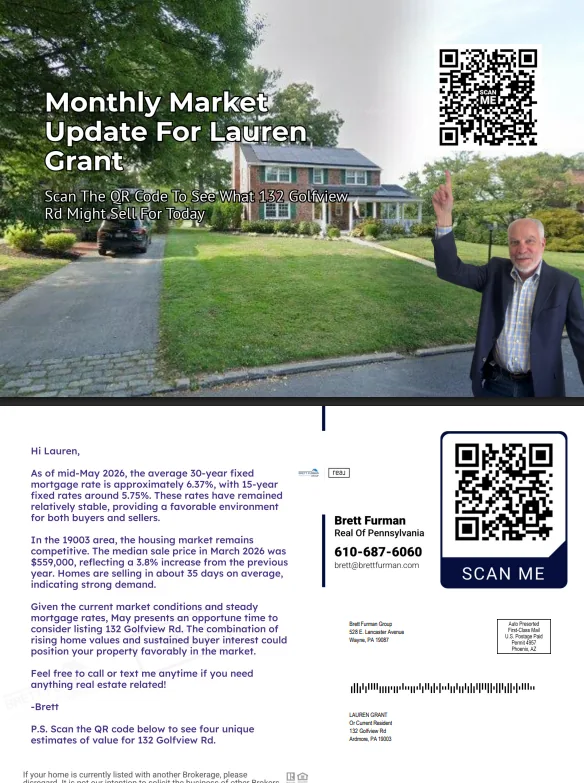
Click the postcard image above to zoom in and read the exact AI-generated market update copy.
Google Street View of THEIR House
Using Thanks.io's ~STREET_VIEW~ dynamic background, every card automatically prints an actual photo of the recipient's own home on the front.
You Standing on Their Lawn Pointing Up
A 1875×1275 transparent PNG overlay places you right on their front yard pointing straight up at the top-right QR code.
Live AI Macro + Local ZIP Market Update
Before printing each month, Thanks.io's built-in GPT engine writes a fresh <175-word update covering current 30-yr/15-yr mortgage rates, local %CITY%, %STATE% stats, and why now is a smart time to list %ADDRESS%.
"Scan to See What %ADDRESS% Might Sell For Today"
Every homeowner is curious what their house is worth. When they scan, Thanks.io captures their exact name and address and alerts your CRM in real time.
How To Set Up The Campaign In 15 Minutes
Every Thanks.io automated campaign has three building blocks: 1) An Image Template, 2) A Message Template, and 3) A Mailing List + Campaign Rule. Follow the steps below (or let your AI agent run the prompt above).
Import the Dynamic Image Template & Add Your “Pointing” Cutout
Log into dashboard.thanks.io and click the Dynamic Image Share Link to open the template in your account. Inside the editor, verify these exact settings:
- Template Layout: Choose the 2nd option where the QR Code is in the Top Right corner (so your photo in the bottom right can point straight up at it).
- Background Image: Keep set to
Street View(merges Google Street View of the homeowner's address). - Header:
Monthly Market Update For %FULL_NAME% - Subheader:
Scan The QR Code To See What %ADDRESS% Might Sell For Today - QR Code Redirect URL: Keep set to
Message QR(automatically inherits the URL from your Message Template). - Logo Image URL: Pro Tip from Ryan: Delete/leave blank so a logo box doesn't cover the homeowner's roof.
How to Do the “Standing on Their Lawn Pointing” Trick:
- Take a photo of yourself looking at the camera and pointing above your head (or tell ChatGPT/Gemini: “Take this photo of me and make me point above my head while smiling at the camera”).
- Open Canva → Click Create a Design → Custom Size: 1875 × 1275 px (Thanks.io's 6x9 postcard canvas).
- Upload your photo, remove the background, and position yourself in the bottom-right corner so your finger points up toward the top-right QR code area.
- Click Share → Download → PNG and check Transparent Background.
- Upload that 1875×1275 transparent PNG into the Overlay Graphic box (the last input at the bottom of the Thanks.io Dynamic Image editor), click Generate Preview, and click Save!

Want our team to create your pointing overlay for you? If you're loading a list of 100+ contacts, email [email protected] and we'll design it for you!
Load the AI Newsletter Message Template & Set Your QR Valuation Link
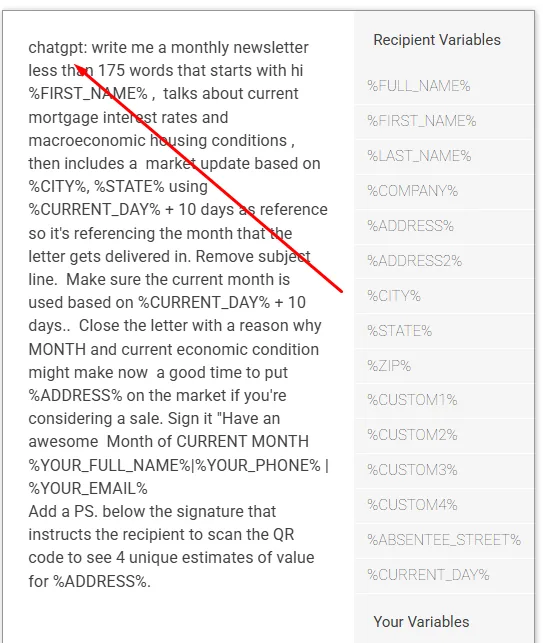
Click the AI Message Template Share Link while logged in (or go to Message & QR Templates in the left sidebar). Instead of static text that goes stale, this template starts with chatgpt: so Thanks.io dynamically writes a brand-new local market update for each recipient's city/ZIP code every single month!
chatgpt: write me a monthly newsletter less than 175 words that starts with hi %FIRST_NAME% , talks about current mortgage interest rates and macroeconomic housing conditions , then includes a market update based on %CITY%, %STATE% using %CURRENT_DAY% + 10 days as reference so it's referencing the month that the letter gets delivered in. Remove subject line. Make sure the current month is used based on %CURRENT_DAY% + 10 days.. Close the letter with a reason why MONTH and current economic condition might make now a good time to put %ADDRESS% on the market if you're considering a sale. Sign it "Have an awesome Month of CURRENT MONTH %YOUR_FULL_NAME%|%YOUR_PHONE% | %YOUR_EMAIL%
Add a PS. below the signature that instructs the recipient to scan the QR code to see 4 unique estimates of value for %ADDRESS%.
In the QR Code URL field, paste the link to your Check Your Home Value / Seller Valuation page (e.g., BoldTrail/kvCORE, Lofty, Sierra, Homebot, Cloud CMA, RealReports.ai, or iList). Don't have a home value landing page yet? Just leave the Thanks.io Default QR Page selected — it automatically displays your contact info on scan and notifies you immediately so you can send their CMA manually!
Create Your “Monthly Market Update” List & Set the Monthly Rule
A. Create the Mailing List
- Go to Mailing Lists in your Thanks.io dashboard.
- Look for the preloaded Monthly Market Update list, or click Add New List and name it
Monthly Market Update. - Note: As you scale, you can create separate lists for different segments (e.g., MMO - Past Clients & Sphere vs. MMO - Cold Farm).
B. Attach the Automated Campaign Rule
- Go to Campaigns / Automations → Click Add Automation.
- Select Send Postcard and choose size 6x9 (important: keep it 6x9 so the street view + AI newsletter have plenty of room).
- Select your Monthly Market Update image template, message template, and mailing list.
- When to Send: Select Monthly Recurring (e.g., 1st of every month). Want bimonthly or quarterly instead? Use Days After Added to List (e.g., Day 30, clone for Day 90, Day 180).
3 Ways to Feed Homeowners Into Your Monthly Machine
1. Email-Only Sphere Upload (Address Append)
Only have names and email addresses for your sphere? Upload your CSV directly into the Monthly Market Update list — Thanks.io automatically matches email addresses to physical street addresses!
2. Cold Demographic Radius Search ($0.05/Record)
Don't have a list? Drop a pin anywhere in Thanks.io's Mailing List Builder and pull Likely to Move, Majority Home Equity, or 30+ Year Homeowners for just 5¢ a record.
3. Live CRM + AI MCP Auto-Sync
Use the CRM Prompt Generator above to connect Follow Up Boss, GoHighLevel, BoldTrail, Lofty, or Sierra via MCP, Inbound Webhooks, or Zapier so every new lead is enrolled automatically.
Why the Math on This Campaign Is a Total No-Brainer
Most agents send one generic postcard and quit. Here is what happens when you show up on a homeowner's kitchen counter 12 times a year with a photo of their own house:
Roughly ~$1/month per homeowner on Business/Enterprise tiers
1,200 hyper-personalized Street View postcards delivered over 12 months
1,277 scans across 16,000 cards in our Q2 2026 study ($14.28 per scan)
Convert just 1 of 100 into a listing, buyer, or referral for <$1,200 CPA
Bring a List of 100–300+ Homeowners & We'll Set Up Your Monthly Market Update Campaign Free.
As Ryan mentions at the end of the video: full white-glove implementation is included on our Professional Plan, but even if you aren't ready to upgrade to Professional yet, if you have a list of 100, 200, or 300+ people ready to receive this Monthly Market Update card, our team will set up the templates, your pointing overlay, and your list for you!